Treemap Variations in Python
Going beyond squarify and plotting NetworkX trees with full flexibility
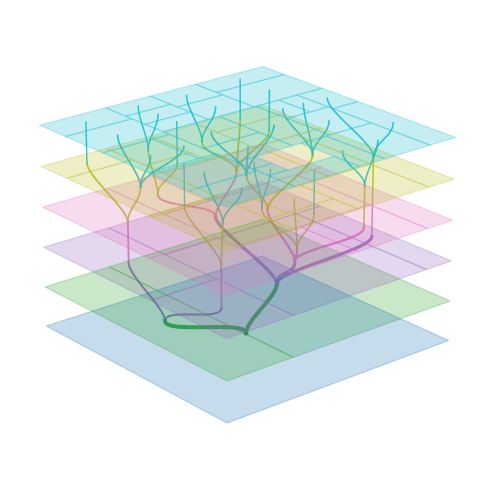
If you have worked with treemaps in Python, you have probably reached for the squarify library. It is straightforward, well-documented, and produces clean, square-ish rectangles that are easy to read. But treemaps are a surprisingly rich visualization family, and squarify only scratches the surface.
This article reviews treemap algorithms and their trade-offs, before introducing a flexible Python module (provided in the appendix) for plotting any NetworkX tree with your choice of tiling strategy, plotting and labeling parameters.
Starting from the Squarify Algorithm
The squarify library implements the squarified treemap algorithm of Bruls et al. 2000, which optimizes for aspect ratios close to 1.
As shown in the simple example below, the result is esthetically more pleasing than that obtained by slicing the same rectangle along a single direction. This also makes smaller rectangles easier to discern, and reduces the total length of lines, thereby optimizing your data-to-ink ratio.
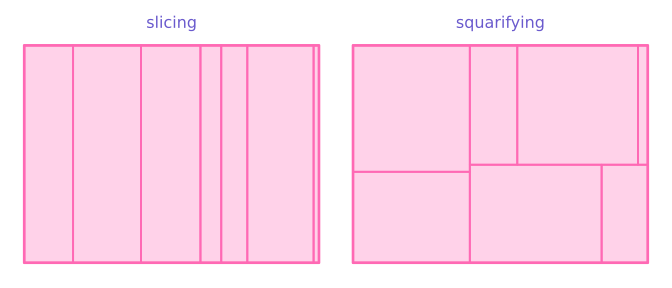
However, this example — and basic squarify usage in general — uses flat data (just a list of positive numbers), and I would argue that you do not need a treemap at all to display this sort of data. A bar chart would suffice, and allow values to be compared more accurately. As their name implies, treemaps are useful to visualize trees, i.e. hierarchical data.
Treemaps for Hierarchical Structure
Recursion is the key idea that allows squarify — or any other tiling method — to be applied to deep hierarchical structures:
- Start from the tree root, a single node corresponding to the overall figure rectangle.
- Get the node’s children and their values. Tile the rectangle according to these values.
- For each child node, do the same thing (i.e. go back to 2).
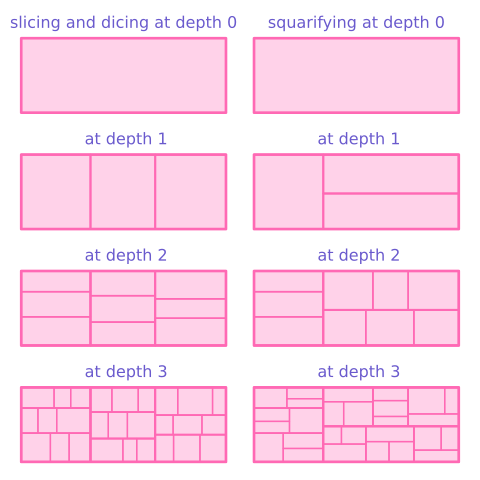
The module made available in the appendix preserves this hierarchy by recursively partitioning space, and optionally includes internal (non-leaf) nodes in the output. This enables visualizations where you can see both the forest and the trees: parent rectangles encompass their children, with borders indicating nesting depth.
The module below uses NetworkX DiGraph objects to represent trees. This is a natural choice for me, as NetworkX is a standard Python library for graph structures and provides built-in tree validation as well as convenient traversal methods like successors(). If your hierarchical data can be converted to a DiGraph, you get treemap visualization with minimal boilerplate:
import networkx as nx
from matplotlib import pyplot as plt
from treemaps import plot_rectangular_tree_map, squarify_tiling

# Build a simple tree
tree = nx.DiGraph()
tree.add_node("root", size=10)
tree.add_node("A", size=6)
tree.add_node("B", size=4)
tree.add_edges_from([("root", "A"), ("root", "B")])

# Plot it
fig, ax = plt.subplots()
plot_rectangular_tree_map(tree, ax, tiling_function=squarify_tiling)
Alternative Tiling Algorithms
The module made available in the appendix demonstrates how to implement multiple tiling strategies incorporated in the same recursive partitioning layout engine. Each tiling strategy has distinct characteristics, and choosing between them requires understanding the trade-offs:
- Aspect ratio: How close to square are the rectangles? Elongated rectangles are harder to compare by area and waste visual space.
- Stability: How much does the layout change when the underlying data changes? Stable layouts matter for animations or comparing snapshots over time.
- Hierarchy clarity: Can you read the tree structure from the layout alone? Hierarchy clarity is highest in slice-and-dice layouts, which alternate slicing direction at each level, so that all siblings share the same orientation and parent-child relationships can be traced just by reading the pattern of horizontal and vertical strips.
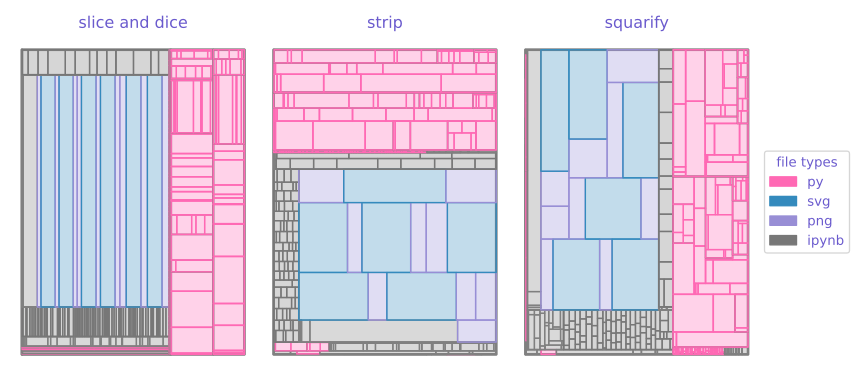
Squarify optimizes purely for aspect ratio, shuffling items as needed. This focus on aspect ratio results in lower stability and hierarchy clarity. The tree hierarchy is not visible at a glance in squarified treemaps: the algorithm places rectangles wherever they achieve the best aspect ratio, so siblings may scatter with no consistent spatial relationship. Also, the layout can shift dramatically with small data changes.
Slice-and-Dice is the original treemap algorithm. It alternates between horizontal and vertical slicing at each depth level. The result? Highly elongated rectangles that can be hard to read, but with one significant advantage: the layout clearly shows the hierarchy and it is stable.
Strip Treemap takes a middle path. It fills horizontal strips across the full width of the parent rectangle, starting a new strip whenever adding another item would worsen the average aspect ratio. You get better shapes than slice-and-dice while maintaining some ordering predictability.
Building a Flexible Layout Engine
The module achieves flexibility by accepting behavior as arguments rather than hardcoding it. Tiling algorithms, rendering functions, and labeling logic are all passed in as callables, making them interchangeable. Sensible defaults keep simple use cases simple, while power users get full control.
Labeling alone illustrates why this matters: you may prefer horizontal text, allow vertical orientation for tall rectangles, set different size thresholds for which nodes get labels, or tolerate varying degrees of text overlap — choices that depend on your data and audience.
The key insight is separating the tiling function from the layout traversal. A tiling function has a simple signature: given a list of children with sizes and a parent rectangle, return positioned child rectangles. This makes algorithms interchangeable:
TilingFunction = Callable[
    [list[tuple[Any, float]], Rectangle, int],
    list[tuple[Any, Rectangle]],
]
The get_rectangular_tree_map_layout function handles the recursive tree traversal, calling whatever tiling function you provide. Want to experiment with a new algorithm? Just write a function matching that signature.
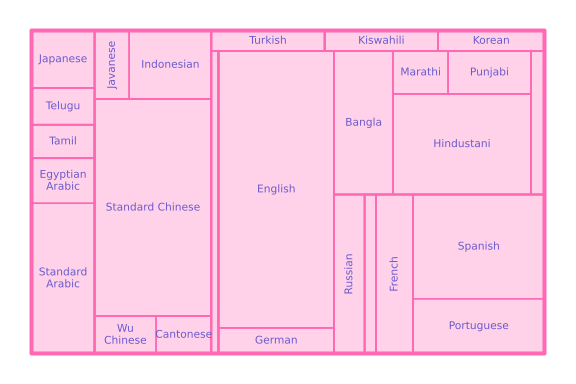
Similarly, the node labeling strategy can be changed by passing the node_labeling_function argument. My default node labeling function prioritizes horizontal labels, while falling back to vertical labels for high and thin rectangles, and doing without label altogether for excessively small nodes. I quite like the results for trees of moderate complexity, as the “natural language tree” shown below.
Conclusions
More than a single algorithm, treemaps are a design space. The Python code provided with this article enables you to explore this space.
The squarify library is excellent for what it does, but it only implements one of many tiling schemes. You may want to consider alternatives to the squarified layout when the clarity of the hierarchy is important, or when you are animating changes over time and need layout stability.
And treemaps themselves are just one way to visualize hierarchical data. Node-link diagrams make the tree structure explicit but they are less space-efficient and do not encode numerical values as clearly. Icicle plots can be seen as “unrolled” treemaps where depth runs along one axis, and sunburst charts as a variation using polar coordinates.
As I wrote in my tidy tree layout article, trees can be found everywhere, not only in forests, also in computer science, biology, data science and other sciences, so let us keep exploring ways to visualize them.
References
Johnson, B., & Shneiderman, B. (1998). Tree-maps: A space filling approach to the visualization of hierarchical information structures. UM Computer Science Department; CS-TR-2657.
- introduced tree-maps as a visualization method
Bruls, M., Huizing, K., & Van Wijk, J. J. (2000). Squarified treemaps. In VisSym (pp. 33-42).
- introduced the squarified layout
Bederson, B. B., Shneiderman, B., & Wattenberg, M. (2002). Ordered and quantum treemaps: Making effective use of 2D space to display hierarchies. ACM Transactions on Graphics (TOG), 21(4), 833–854.
- compared a variety of treemap algorithms and introduced the strip treemap algorithm
Note: One person particularly associated with treemaps is Ben Schneiderman
Appendix: the Code
"""Plotting rectangular treemaps"""

import textwrap
from dataclasses import dataclass
from typing import Any, Callable

import matplotlib.colors as mcolors
import matplotlib.patches as patches
import networkx as nx
import squarify
from matplotlib import pyplot as plt
from matplotlib.typing import ColorType


@dataclass
class Rectangle:
    """Represents a rectangle."""

    x: float  # Bottom-left x coordinate
    y: float  # Bottom-left y coordinate
    width: float
    height: float

    def aspect_ratio(self) -> float:
        """Calculate aspect ratio of rectangle"""
        return max(self.width / self.height, self.height / self.width)


@dataclass
class RectangularTreeNode(Rectangle):
    """Represents a rectangular node in a tree map layout.

    This extends the rectangle geometry with tree-related metadata."""

    node: Any  # Node identifier from the tree
    depth: int  # Depth in tree (for styling)
    is_leaf: bool
    label: str = ""


# Type alias for tiling function signature
# Input: children (list of (node, size)), x, y, width, height, depth
# Output: list of (node, x, y, width, height)
TilingFunction = Callable[
    [list[tuple[Any, float]], Rectangle, int],
    list[tuple[Any, Rectangle]],
]


def slice_and_dice_tiling(
    children: list[tuple[Any, float]],
    rectangle: Rectangle,
    depth: int,
    start: str = "horizontal",
) -> list[tuple[Any, Rectangle]]:
    """
    Slice-and-dice tiling algorithm.

    Alternates between horizontal and vertical slicing based on depth.
    This is the simplest treemap algorithm but can produce very elongated rectangles.

    Args:
        children: List of (node, size) tuples
        rectangle: parent rectangle
        depth: Current depth in tree (determines slicing direction)
        start: "horizontal" or "vertical"

    Returns:
        List of (node, Rectangle) tuples for each child
    """

    if start == "horizontal":
        horizontal_modulo = 0
    elif start == "vertical":
        horizontal_modulo = 1
    else:
        raise ValueError(f"Unknown start: {start}")

    if not children:
        return []

    result = []
    total_value = sum(size for _, size in children)

    if depth % 2 == horizontal_modulo:
        # Horizontal slicing (divide width)
        current_x = rectangle.x
        for node, size in children:
            child_width = (size / total_value) * rectangle.width
            child_rectangle = Rectangle(
                current_x, rectangle.y, child_width, rectangle.height
            )
            result.append((node, child_rectangle))
            current_x += child_width
    else:
        # Vertical slicing (divide height)
        current_y = rectangle.y
        for node, size in children:
            child_height = (size / total_value) * rectangle.height
            child_rectangle = Rectangle(
                rectangle.x, current_y, rectangle.width, child_height
            )
            result.append((node, child_rectangle))
            current_y += child_height

    return result


def squarify_tiling(
    children: list[tuple[Any, float]], rectangle: Rectangle, depth: int
) -> list[tuple[Any, Rectangle]]:
    """
    Squarify tiling algorithm using the squarify library.

    Optimizes aspect ratios to create more square-like rectangles.
    Uses the squarify library which implements the squarified treemap algorithm.

    Args:
        children: List of (node, size) tuples
        rectangle: parent rectangle
        depth: Current depth (not used in squarify, included for interface compatibility)

    Returns:
        List of (node, Rectangle) tuples for each child
    """
    if not children:
        return []

    # Extract sizes and nodes
    sizes = [size for _, size in children]
    nodes = [node for node, _ in children]

    # Use squarify library to compute layout
    norm_sizes = squarify.normalize_sizes(sizes, rectangle.width, rectangle.height)

    rects = squarify.squarify(
        norm_sizes, rectangle.x, rectangle.y, rectangle.width, rectangle.height
    )

    # Convert squarify output format to our format
    # squarify returns list of dicts: [{'x': ..., 'y': ..., 'dx': ..., 'dy': ...}, ...]
    result = []
    for node, rect_dict in zip(nodes, rects):
        child_rectangle = Rectangle(
            rect_dict["x"], rect_dict["y"], rect_dict["dx"], rect_dict["dy"]
        )
        result.append((node, child_rectangle))

    return result


def strip_treemap_tiling(
    children: list[tuple[Any, float]],
    rectangle: Rectangle,
    depth: int,
) -> list[tuple[Any, Rectangle]]:
    """
    Strip treemap tiling algorithm.

    Partitions the layout rectangle into horizontal strips, each spanning the
    full width of the rectangle. Rectangles within a strip are placed side by
    side. A new strip is started whenever adding the next rectangle would
    increase the average aspect ratio of the current strip.

    Args:
        children: List of (node, size) tuples
        rectangle: Parent rectangle to tile
        depth: Current depth in tree (not used, included for interface compatibility)

    Returns:
        List of (node, Rectangle) tuples for each child
    """
    if not children:
        return []

    # Step 1: Scale areas so total equals layout rectangle area
    total_layout_area = rectangle.width * rectangle.height
    total_input_area = sum(size for _, size in children)
    scale = total_layout_area / total_input_area
    items = [(node, size * scale) for node, size in children]

    result = []
    current_y = rectangle.y
    idx = 0

    while idx < len(items):
        # Step 2: Create a new empty strip
        strip = []
        prev_avg_ar = None

        while idx < len(items):
            # Step 3: Tentatively add next rectangle to current strip,
            # recomputing strip height and rectangle widths
            strip.append(items[idx])

            strip_area = sum(a for _, a in strip)
            strip_height = strip_area / rectangle.width
            avg_ar = sum(
                max(a / strip_height**2, strip_height**2 / a) for _, a in strip
            ) / len(strip)

            # Step 4: If average AR increased, remove rectangle and start new strip
            if prev_avg_ar is not None and avg_ar > prev_avg_ar:
                strip.pop()
                break

            # Accept the rectangle and advance
            prev_avg_ar = avg_ar
            idx += 1

        # Step 5: Emit rectangles for the finalized strip
        strip_area = sum(a for _, a in strip)
        strip_height = strip_area / rectangle.width
        current_x = rectangle.x

        for node, area in strip:
            child_width = area / strip_height
            result.append(
                (node, Rectangle(current_x, current_y, child_width, strip_height))
            )
            current_x += child_width

        current_y += strip_height

    return result


def find_root_node(tree: nx.DiGraph) -> Any:
    """Find root node of a tree"""
    roots = [n for n in tree.nodes() if tree.in_degree(n) == 0]
    if not roots:
        raise ValueError("Tree must have a root node (no incoming edges)")
    if len(roots) > 1:
        raise ValueError("Tree must have exactly one root node")
    root = roots[0]
    return root


def get_rectangular_tree_map_layout(
    tree: nx.DiGraph,
    size_attribute: str = "size",
    tiling_function: TilingFunction = slice_and_dice_tiling,
    add_non_leaf_nodes: bool = True,
    x_start: float = 0,
    y_start: float = 0,
    width: float = 1,
    height: float = 1,
) -> list[RectangularTreeNode]:
    """
    Compute rectangular tree map layout using the specified tiling algorithm.

    Args:
        tree: A directed graph representing the tree structure
        size_attribute: Node attribute containing size/weight values
        tiling_function: Function that determines how to tile rectangles.
            Can be slice_and_dice_tiling, squarify_tiling, or strip_treemap_tiling.
        add_non_leaf_nodes: If True, include internal (non-leaf) nodes in the output layout
        x_start: X coordinate of the bottom-left corner of the root rectangle
        y_start: Y coordinate of the bottom-left corner of the root rectangle
        width: Width of the root rectangle
        height: Height of the root rectangle

    Returns:
        list of RectangularTreeNode objects
    """
    if not nx.is_tree(tree):
        raise ValueError("Input graph must be a tree")

    # Find root node (node with no predecessors)
    root = find_root_node(tree)

    # Validate that all nodes have size values
    for node in tree.nodes():
        if size_attribute not in tree.nodes[node]:
            raise ValueError(f"Node {node} is missing '{size_attribute}' attribute")

    layout_nodes = []

    def compute_layout(node, rectangle: Rectangle, depth: int):
        """Recursively compute layout for node and its children."""
        children = list(tree.successors(node))

        label = tree.nodes[node].get("label", str(node))
        is_leaf = not children
        layout_node = RectangularTreeNode(
            node=node,
            x=rectangle.x,
            y=rectangle.y,
            width=rectangle.width,
            height=rectangle.height,
            depth=depth,
            label=label,
            is_leaf=is_leaf,
        )
        if is_leaf:
            # Leaf node - add to layout
            layout_nodes.append(layout_node)
        else:
            if add_non_leaf_nodes:
                layout_nodes.append(layout_node)
            # Internal node - partition space among children using tiling function
            children_with_sizes = [
                (child, tree.nodes[child][size_attribute]) for child in children
            ]

            # Apply the tiling function to get layout for children
            child_layouts = tiling_function(children_with_sizes, rectangle, depth)

            # Recursively compute layout for each child
            for child_node, child_rectangle in child_layouts:
                compute_layout(child_node, child_rectangle, depth + 1)

    # Start computing from root
    start_rectangle = Rectangle(x_start, y_start, width, height)
    compute_layout(root, start_rectangle, 0)

    return layout_nodes


def default_node_labeling_function(
    rect_node: RectangularTreeNode,
    ax: plt.Axes,
    min_width: float = 0.125,
    min_height: float = 0.05,
    data_units_per_char: float = 0.02,
) -> None:
    """Plot label if rectangle is large enough

    Args:
        rect_node: RectangularTreeNode
        ax: Matplotlib axes to draw on
        min_width: Minimum width of rectangle to plot label
        min_height: Minimum height of rectangle to plot label
        data_units_per_char: Number of data units per character
            this depends on the font size and the figure size
    """
    if not rect_node.is_leaf:
        return

    text_kwargs = dict(ha="center", va="center", fontsize=8)

    # Determine orientation and the "text dimension" (the axis along which
    # characters are laid out).
    if rect_node.width >= min_width and rect_node.height > min_height:
        rotation = 0
        text_dim = rect_node.width  # characters run horizontally
    elif rect_node.height >= min_width and rect_node.width > min_height:
        rotation = 90
        text_dim = rect_node.height  # characters run vertically
    else:
        return  # rectangle too small in both dimensions

    # Estimate how many characters fit along the text dimension.
    max_chars = max(1, int(text_dim / data_units_per_char))

    # Wrap the label to fit the rectangle
    lines = textwrap.wrap(rect_node.label, width=max_chars, break_long_words=False)
    if not lines:
        return

    label = "\n".join(lines)

    ax.text(
        rect_node.x + rect_node.width / 2,
        rect_node.y + rect_node.height / 2,
        label,
        rotation=rotation,
        **text_kwargs,  # type: ignore
    )


def default_rectangle_plotting_function(
    rect_node: RectangularTreeNode,
    ax: plt.Axes,
    max_line_width: float = 3.0,
    leaf_face_alpha: float = 0.3,
    face_color: ColorType = "C0",
    edge_color: ColorType = "C0",
) -> None:
    """Default function for plotting treemap rectangles.

    Args:
        rect_node: RectangularTreeNode to draw
        ax: Matplotlib axes to draw on
        max_line_width: Maximum line width for rectangle edges (scaled by depth)
        leaf_face_alpha: Alpha (transparency) value for leaf node fill color
        face_color: Fill color for rectangles
        edge_color: Edge color for rectangles
    """
    edge_alpha = 1.0
    edge_color = mcolors.to_rgba(edge_color, alpha=edge_alpha)
    if rect_node.is_leaf:
        face_alpha = leaf_face_alpha
    else:
        # non-leaf nodes transparent
        face_alpha = 0.0

    face_color = mcolors.to_rgba(face_color, alpha=face_alpha)

    rect = patches.Rectangle(
        (rect_node.x, rect_node.y),
        rect_node.width,
        rect_node.height,
        linewidth=max_line_width / (1 + rect_node.depth) ** 0.5,
        edgecolor=edge_color,
        facecolor=face_color,
    )
    ax.add_patch(rect)


def plot_rectangular_tree_map(
    tree: nx.DiGraph,
    ax: plt.Axes,
    size_attribute: str = "size",
    tiling_function: TilingFunction = slice_and_dice_tiling,
    x_start: float = 0,
    y_start: float = 0,
    width: float = 1,
    height: float = 1,
    rectangle_plotting_function: Callable[
        [RectangularTreeNode, plt.Axes], None
    ] = default_rectangle_plotting_function,
    node_labeling_function: Callable[
        [RectangularTreeNode, plt.Axes], None
    ] = default_node_labeling_function,
) -> None:
    """
    Plot a rectangular tree map with the specified tiling algorithm.

    Args:
        tree: A directed graph representing the tree structure. Must have a
            single root node (no incoming edges) and each node must have
            the size_attribute defined.
        ax: Matplotlib axes to draw on
        size_attribute: Node attribute containing size/weight values
        tiling_function: Function that determines how to tile rectangles.
            Can be slice_and_dice_tiling, squarify_tiling, or strip_treemap_tiling.
        x_start: X coordinate of the bottom-left corner of the root rectangle
        y_start: Y coordinate of the bottom-left corner of the root rectangle
        width: Width of the root rectangle
        height: Height of the root rectangle
        rectangle_plotting_function: Callable that draws each rectangle node.
            Signature: (RectangularTreeNode, plt.Axes) -> None.
            Defaults to default_rectangle_plotting_function.
        node_labeling_function: Callable that draws labels for each node.
            Signature: (RectangularTreeNode, plt.Axes) -> None.
            Defaults to default_node_labeling_function.
    """
    # Get layout
    layout = get_rectangular_tree_map_layout(
        tree,
        size_attribute,
        tiling_function,
        x_start=x_start,
        y_start=y_start,
        width=width,
        height=height,
    )

    # Set up the canvas
    delta = 0.05
    ax.set_xlim(-delta, width + delta)
    ax.set_ylim(-delta, height + delta)

    # Plot each node in the layout
    for rect_node in layout:
        # Draw rectangle
        rectangle_plotting_function(rect_node, ax)
        node_labeling_function(rect_node, ax)

    ax.axis("off")