Ten Things I Check Before Installing a New Python Package
Cheap checks now instead of expensive migrations later.
Whatever command you use to install a new Python package, be it pip install or uv add, and even more so if your favorite AI agent runs it for you, this is a quick command, but it can have deep, lasting impact.
Changing a dependency down the line is likely to cost much more effort than going through the following few checks.
1. Timeline of releases
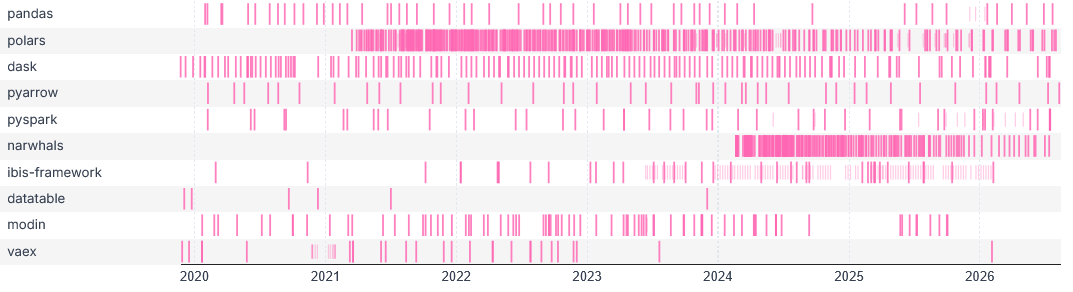
The first thing I look at in a candidate package is the frequency with which new package versions are being released. While a new release every 2 days is not necessarily a sign of quality, no new releases for more than 6 months shows a dangerous lack of maintainer activity.
If you are looking for a dataframe library, the following plot of release events should be enough for you to avoid datatable (no release since 2024) and vaex (one release since 2024), unless you have a compelling reason to use them anyway.
Release timing alone is of course only a superficial indicator, and a look at the change log of a project can reveal much deeper insights into the pace and relevance of development.
In a way, package releases are just numbers stamped on top of a bundle of (possibly numerous) features, bug fixes and other changes, so the detail-oriented package user will want to look at the underlying timeline of commits. This brings us to our second item.
2. GitHub activity
These days, most open-source Python packages have their source hosted on GitHub. There, you can see all commits merged into the project. Commit timing is as interesting as release timing, and tends to be a higher-resolution indicator. I wrote a story about this two years ago: Exploring activity in open-source machine learning frameworks.
Another relevant factor is who authored these commits. Is there a wide base of regular contributors or is the project entirely driven by one or two contributors?
While you are on GitHub, you will likely see how many stars have been given to the repo behind your package. These stars are an indicator of popularity, which may not be very interpretable beyond the fact that higher is generally better.
Issues are a richer but trickier indicator, which will require more acumen to interpret. Seeing that the last issue dates from several months ago is a bad sign. A huge backlog of issues accumulating day after day may not be a good sign either. The best projects would probably feature a steady cadence of issues being opened and closed, as well as supportive answers on most issues.
3. PyPI downloads
Package downloads on PyPI are another indicator of popularity. As with GitHub stars, this is a flawed and inaccurate indicator, but better than nothing.
ClickPy by ClickHouse is a great way to access PyPI download data aggregated at various levels. To make sense of these download numbers, read my blog post on the topic, which explains that PyPI downloads tend to be highest for packages that are used, directly or indirectly, by many other packages — and also that things are complicated. Look at the orders of magnitude and at the trends, but do not worry about differences below 50%.
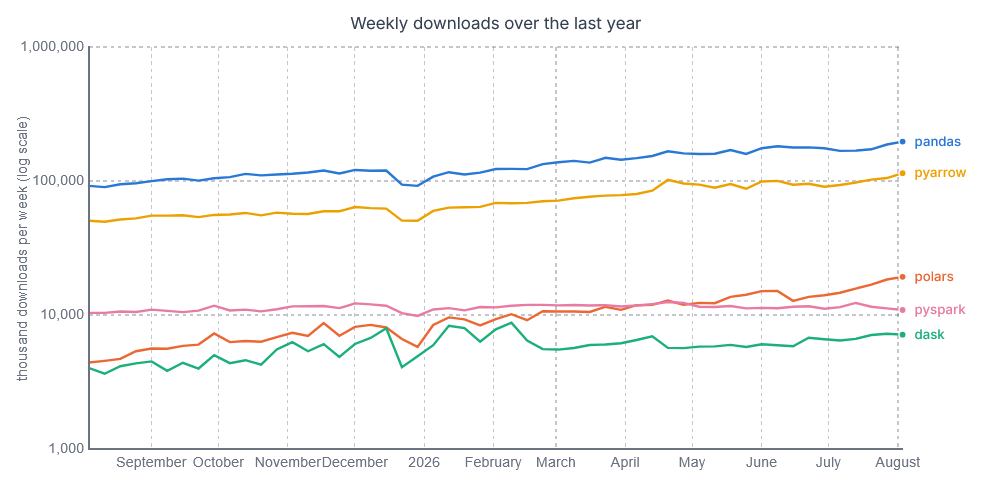
Also note that PyPI downloads are generally increasing at a surprisingly fast rate. A classic package like pandas did not make the headlines in the last 12 months, but still doubled in number of downloads. Conversely, a stable number of downloads (pyspark in our example) can be seen as a sign of stagnation.
4. Downstream: dependent packages
Knowing which packages depend on a given package can give context on the number of downloads. While PyPI downloads conflate direct popularity and the popularity of dependent packages, the latter is also an interesting topic in itself. If many packages depend on a given package, I view this package as more… dependable.
For instance, jsonschema is trusted by many packages from altair to vllm, so I am rather confident it could meet my needs in terms of JSON Schema validation.
5. Upstream: dependencies
Conversely, knowing the dependencies of a package is another important piece of information.
Direct dependencies are only the shallow part of the whole dependency network, which can be multiple layers deep. Such a dependency network can be formalized as a directed acyclic graph (DAG) and visualized using a Sankey-like diagram, as illustrated below for the strands-agents Python package.
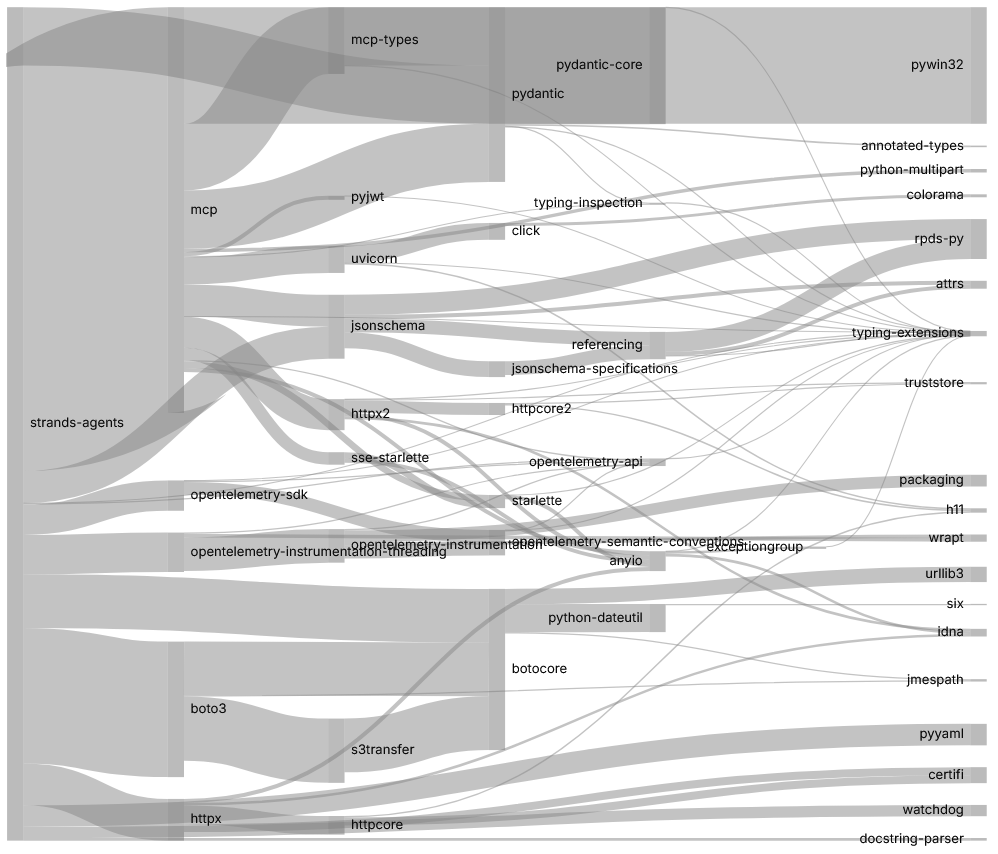
Some of the questions you can ask:
What is the package based on?
Does the package come with a host of dependencies likely to bloat my dependencies? If so, is there a lightweight alternative?
Is the package just a thin wrapper around one or more of its dependencies? If so, using the dependency directly may be an option.
6. Sideways: similar packages
More generally, you obviously want to look for packages that are similar to your candidate package and could potentially do a better job.
Googling “alternative to {your candidate package}” is one way to do that. Chatbots can also answer the question, but they may not be aware of the latest alternatives.
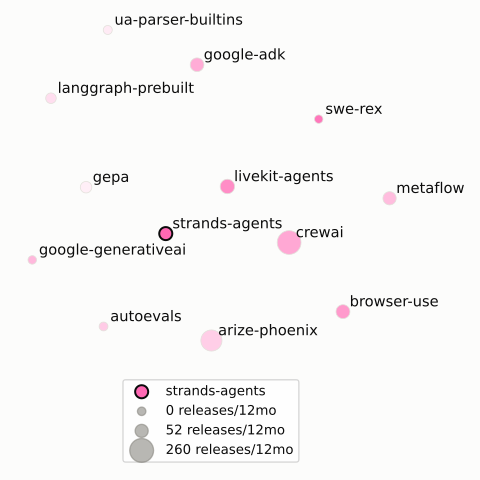
A more technically involved but independent way of finding similar packages is to use text embeddings of package descriptions and perform vector search on them. This is the mechanism behind the Similar packages section in PySpect package profiles. You can also rerank and filter the results based on additional metadata, for instance the number of releases in the last year, to obtain an almost scientifically grounded list of alternative candidates.
7. Documentation quality
Documentation can have a huge impact on the usability of a package. Here are some of the questions you can ask to convince yourself that a package is really well documented.
Is there a homepage?
Is the API documented clearly? For the current and for past versions?
Are the concepts explained in a helpful way?
Are tutorials and/or examples with varying levels of difficulty available?
Read the package description on PyPI and/or the source repository’s README file. If the first impression is good, zoom in and answer the next questions:
Do modules, classes and functions have self-evident names following Python conventions?
Do they have helpful docstrings?
Are type stubs shipped with the package?
8. File tree
Talking about zooming in, should we actually check the code?
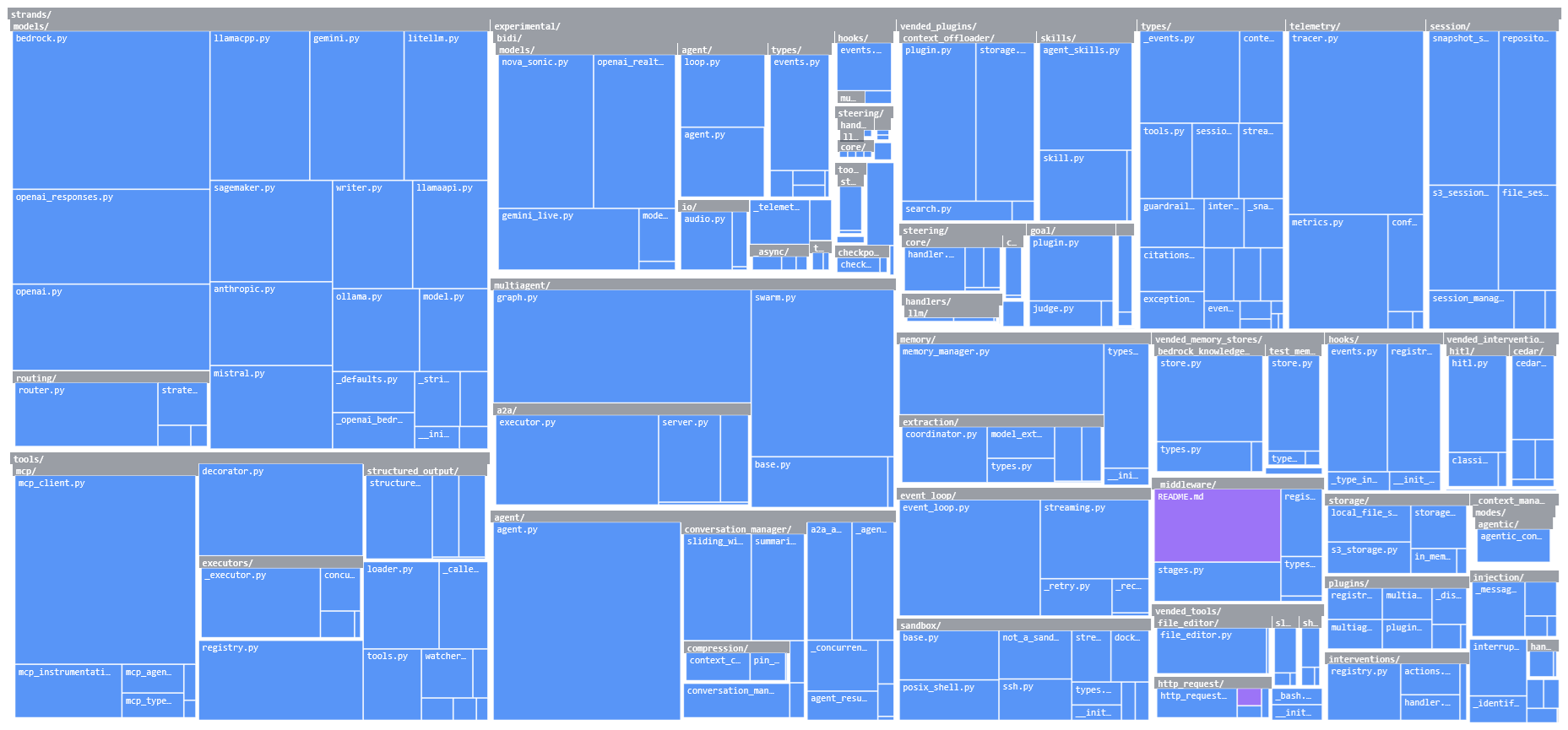
Python packages are composed of modules (.py files) which can be organized in a hierarchy of subpackages (folders with an __init__.py file), so the highest-level view you can take is that of the corresponding file tree.
You can wander about the file tree by browsing GitHub, but for large nested packages this woud mean spending a lot of time exploring only a fraction of the project.
In contrast, a treemap can give you a fast compact overview and provide a visual answer to the following questions:
How many modules are there?
How nested is the subpackage hierarchy?
How much Python is there in the package of interest, and how much C, Rust, JavaScript, FORTRAN?
9. Known vulnerabilities
From the file tree, you might zoom into one module or another, but you are not expected to conduct a detailed security audit. The practical way to know whether the package of interest is safe to run is to look for disclosed vulnerabilities — in the package or any of its dependencies.
A tool like pip-audit can take care of that, based on a scan of the Python Packaging Advisory Database.
10. License
Is the package’s license compatible with your project? And does it even declare a license? If not, you may come to regret it. So look up the license on the PyPI package page, on GitHub or on the PySpect package profile.
11. Bonus: double check the name
This one is so obvious that I am not counting it in the ten things: double check the package name and do not assume the package (install) name is the same as the import name.
The package name is scikit-learn not sklearn. I know it because I made that mistake 10 times.
Conclusions
I hope I have convinced you that investing some time in due diligence before installing a package is worth it. Making an informed decision and minimizing the chances of painful regrets does not need to be difficult. In a nutshell, it is about looking before you leap. Look at the movement (releases and commits), look downstream, look upstream, look sideways, look inside. Pause a few seconds and think. Then leap.
You can print this list and keep it near your computer, or add it to your AGENTS.md file. But the list should not be considered to be exhaustive. I did not mention platform support, social media etc. Most importantly, trust your judgement and your taste.
References and links
PySpect.com is my attempt at making the investigation of Python packages as efficient as possible.
PyPI downloads: As written above, ClickPy by ClickHouse is currently the best way to access PyPI download data aggregated at various levels. https://pepy.tech/ also provides PyPI download statistics. https://www.pypistats.org/ used to provide similar data but does not seem reliably available in 2026.
For vulnerabilities in Python packages, also see Google’s Open Source Vulnerabilities (OSV) and Safety DB by pyup.io.
Older related stories from the same author:
- Visualizing the Dependencies of Python Packages, where I first proposed a Sankey-like diagram to visualize the dependencies between Python packages.
- Exploring activity in open-source machine learning frameworks for an example of using GitHub data to quantify the activity of open-source projects.
- Python Packages for Data Visualization in 2025 for an example of looking for the right package in a given domain.
- Plotting Matplotlib and the most important classes of scikit-learn for data-driven visual explorations of specific Python packages.