Hexbin Plot
Definition
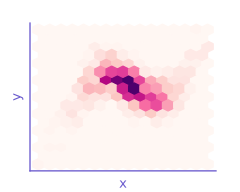
Bivariate chart aggregating data points into hexagonal bins, with color representing point density
Also known as
Hexagonal binning plot, hexagonal binned plot, hex density plot, hexagonal heatmap, hexagonal histogram
Anatomy
A hexbin plot represents the density of data points in a two-dimensional space by dividing the plane into regular hexagonal cells (or “bins”). Each hexagon represents a region of the 2D space, and its color indicates the number of data points falling within that region. The key components include:
- Hexagonal bins: Regular hexagons that partition the coordinate plane
- Color scale: A sequential color gradient representing the count or density of points in each bin
- Axes: Two continuous variables plotted on the x and y axes
- Legend: A color key indicating how the colors map to frequencies or densities
Interpreting a hexbin plot
Hexbin plots should be read by identifying regions of high and low density. The overall pattern reveals the joint distribution of the two variables and can highlight:
- Clusters and hotspots where data points concentrate
- Sparse regions with few observations
- Unimodality or multimodality in the distribution
- Correlation patterns, linear or nonlinear associations between variables
When and how to use a hexbin plot
Strengths
- Handling of large datasets: Excels with thousands or millions of points where scatter plots would suffer from overplotting
- Reveals density patterns: Shows the true distribution of data better than overplotted scatterplots
- Computational efficiency: More efficient to render than plotting individual points
- Hexagonal advantage: Hexagons have better visual properties than squares, with more uniform distances to neighboring cells
Caveats and limitations
- Bin size sensitivity: Results can vary significantly based on the chosen bin size
- Loss of individual data points: Individual observations are no longer visible
- Learning curve: Less intuitive for audiences unfamiliar with the format
- Color perception issues: Effectiveness depends on a well-chosen color scale
- Small dataset limitations: Not suitable for small datasets where individual points matter
Recommendations
- Choose an appropriate bin size: too large and you lose detail; too small and the pattern becomes fragmented
- Use a sequential color scale that intuitively represents density (e.g., light to dark)
- Include a clear color legend with precise count or density values
- Consider log-transforming the color scale when the density varies dramatically
- Label axes clearly and provide context in the caption
Variations and related visualizations
- 2D histograms: Similar to hexbin plots but using rectangular bins instead of hexagons
- Contour plots: Show density using contour lines rather than filled regions
- Kernel density plots: Using smoothing functions to estimate continuous density
- Bubble charts: Vary the size of points rather than using bins