Parallel coordinates
Definition
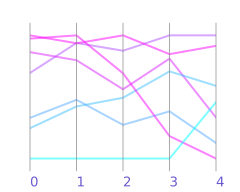
Chart displaying multivariate data, representing each data point as a polyline.
Also known as
Parallel coordinates plot, multivariate line chart
Summary
Parallel coordinates is a visualization technique for displaying multivariate data. A parallel coordinate plot uses n parallel axes to represent an n-dimensional “point” as a two-dimensional polyline crossing each axis at a position determined by the point’s coordinate in the corresponding dimension.
Anatomy
- Vertical axes: Each axis represents one variable or dimension in the dataset, arranged parallel to each other at equal intervals
- Polylines: Each line represents a single data point, connecting its values across all axes from left to right
- Axis scales: Each axis has its own scale, which may be normalized or use the variable’s natural range
- Intersections: The point where a polyline crosses an axis indicates the data point’s value for that variable
- Color coding: Lines are often colored to represent categories, clusters, or to highlight specific data points
Interpreting a parallel coordinates
Lines that follow similar paths indicate data points with comparable characteristics across multiple dimensions. When many lines converge or run parallel between two adjacent axes, this suggests a positive correlation between those variables, while lines that cross in an X-pattern indicate a negative correlation.
Clusters of lines that maintain proximity across several axes reveal groups of similar observations. Dense bundles of lines can indicate common value combinations, while isolated lines represent outliers or unusual cases. The slope and direction of lines between axes provide immediate visual feedback about how values change from one dimension to another.
When and how to use a parallel coordinates
Strengths
- Displays multiple dimensions (often 5-15 variables) in a single view without requiring dimensionality reduction
- Makes correlations and inverse relationships between adjacent variables immediately visible
- Allows interactive filtering by selecting ranges on specific axes to highlight subsets of data
- Reveals outliers and anomalies that deviate from common patterns
- Supports pattern recognition across high-dimensional datasets where scatter plot matrices would become unwieldy
Caveats and limitations
- The order of axes significantly affects pattern visibility, requiring careful consideration or reordering capabilities
- Overplotting becomes problematic with large datasets, making individual lines indistinguishable
- Only relationships between adjacent axes are easily perceived; non-adjacent correlations require mental effort
- Interpretation requires training and familiarity with the technique
- Screen space limits the number of axes that can be displayed effectively
Use cases
- Quality control and process monitoring in manufacturing to identify defective products
- Machine learning for feature selection and understanding model predictions
- Healthcare analytics to identify patient profiles based on multiple clinical measurements
- Network traffic analysis to detect anomalies based on connection characteristics
Recommendations
Place the most important variables or those you want to compare on adjacent axes. Consider normalizing axes to similar scales when variables have vastly different ranges, though this may obscure meaningful magnitude differences. Implement interactive features such as axis reordering, brushing (selecting ranges), and filtering to help users explore the data effectively.
Limit the number of data points displayed or use techniques like opacity adjustment, sampling, or edge bundling to reduce overplotting in large datasets. Provide clear axis labels and consider adding summary statistics or distribution indicators alongside each axis. Use color strategically to encode additional dimensions or to distinguish between predefined groups, but avoid using too many colors that would create visual confusion.
See also
Links
Wikidata entity: Q932996 (parallel coordinates)
Wikipedia page: Parallel coordinates